
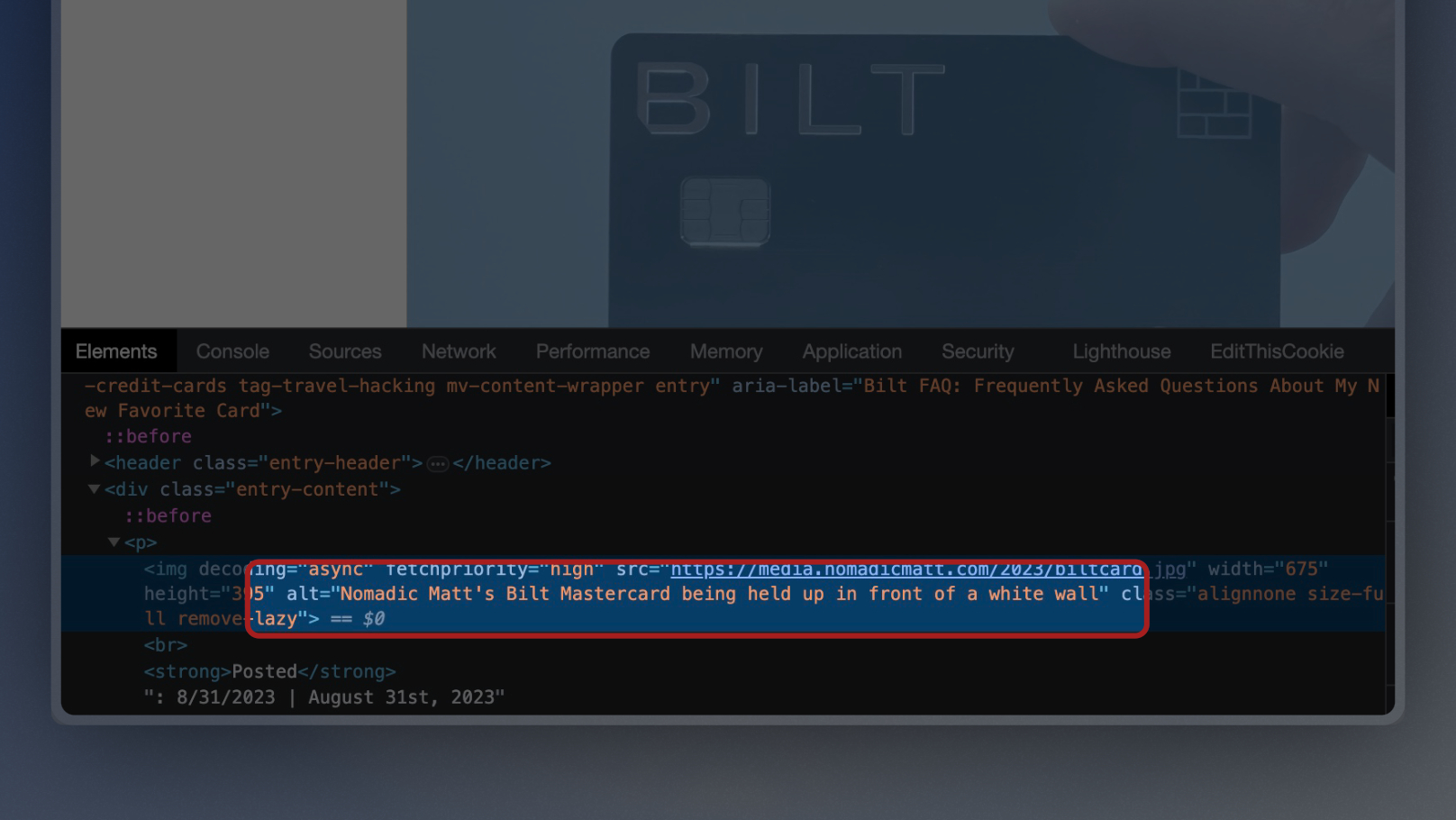
Alt text (short for “alternative text”) is a written description of an image that appears in an HTML image tag’s alt attribute. It’s read aloud by screen readers, displayed when an image fails to load, and used by search engines to understand what an image depicts.
The goal of alt text is simple: describe the image accurately enough that someone who can’t see it knows what it is and why it’s there. That’s it. The SEO benefit is a secondary bonus. The primary job is accessibility.
Why alt text matters
Accessibility (the main reason)
Around 15% of the world’s population has some form of visual impairment, according to the World Health Organization. Screen readers like VoiceOver, NVDA, and JAWS read alt text aloud to describe images. Without alt text, visually impaired users hit a blank “image” announcement and miss whatever the image was trying to communicate.
It’s also a legal requirement in many jurisdictions. The Americans with Disabilities Act (ADA), Section 508, and the European Accessibility Act all require alt text for meaningful images. Sites have been sued over missing alt text, so treat this as compliance, not optional polish.
SEO (the secondary reason)
Google Images uses alt text (and surrounding content) to understand and rank images. Well-written alt text can bring traffic from Google Images, which is a meaningful source for visual-heavy niches: recipes, fashion, product photography, how-to content.
Graceful degradation
When an image fails to load (bad connection, broken CDN, user blocking images), the alt text appears in its place. A user on a slow mobile connection sees “Dashboard showing 32% traffic increase after content refresh” instead of a broken image icon.
What good alt text looks like
Good alt text is:
- Accurate: describes what’s actually in the image
- Succinct: typically under 125 characters (not a hard rule, but a useful target)
- Contextual: describes the image in the context of the surrounding content
- Plain language: no keyword stuffing, no SEO theatrics
Examples of bad alt text
alt="image"alt="SEO Themes best WordPress themes 2026 fastest WordPress theme roundup"(keyword stuffed)alt="happy-team-meeting-stock-photo.jpg"(file name, not description)
Examples of good alt text
alt="Bar chart showing organic traffic increase from 5,000 to 32,000 monthly sessions over six months"alt="Screenshot of WordPress Site Editor showing header customization panel"alt="Chef dicing onions on a wooden cutting board"
Decorative images need empty alt, not missing alt
This is the alt text rule most people get wrong.
If an image is purely decorative (a stock photo of hands on a keyboard that adds no information, an abstract background, a divider line), it should have an empty alt attribute:
<img src="decorative-swirl.svg" alt="">
The empty alt tells screen readers “skip this, it’s decorative.” Screen readers then silently pass it without announcing an image at all. Leaving the alt attribute out entirely (no alt="") causes screen readers to announce the file name, which is much worse.
For decorative SVG icons, use aria-hidden="true" instead so assistive tech ignores them.
What alt text should not do
Don’t start with “image of” or “picture of”
Screen readers already announce the content as an image. Starting alt text with “Image of…” is redundant.
- Bad:
alt="Image of a dog" - Good:
alt="Golden retriever in a field"
Don’t keyword stuff
Alt text is not a keyword dump. Google’s image understanding is sophisticated enough that stuffing keywords does nothing useful and looks spammy. Write naturally.
Don’t duplicate the caption
If the image already has a visible caption, alt text should complement it, not copy it. Screen reader users otherwise hear the same description twice.
Don’t skip alt for infographics and screenshots
For infographics and data visualizations, the image contains information that isn’t in the surrounding text. Write detailed alt text (up to 1-2 sentences) or link to a text version of the data. For screenshots of text, include the key text from the screenshot in the alt.
WordPress-specific alt text tips
WordPress has two places alt text lives:
- Media Library: set the alt text on the image file itself. Every place that image is used inherits this
- Block editor: override alt text per-use under the image block’s Inspector panel (right sidebar)
Best practice: set accurate alt text in the Media Library when you upload, then override per-use only if the context calls for different wording.
The file name also matters. A file uploaded as IMG_4839.jpg gives Google less context than one named generatepress-homepage-2026.jpg. Rename before uploading.
Alt text is not the same as:
- Image title (the tooltip on hover, mostly ignored by browsers and screen readers)
- Caption (visible text below the image, good for context, bad as a replacement for alt)
- Description (WordPress media library field, used only on attachment pages, rarely useful)
How to audit existing images
- Install an accessibility plugin like Accessibility Checker or WP Accessibility, or use the WAVE browser extension
- Scan your top 20 pages
- Fix every missing alt attribute on meaningful images
- Set empty
alt=""on all decorative images - Repeat annually
For large sites, use Screaming Frog to crawl and export every image with missing or too-long alt text in bulk.
For spot checks as you browse, a browser extension is quicker than running a full crawl. The RightBlogger Chrome extension lists every image on the current page alongside its alt text status, so gaps are obvious at a glance, and you can export the list as CSV to work through later.
Where alt text fits in broader SEO
Alt text is one small piece of image SEO and on-page optimization. It works best alongside:
- Compressed, modern-format images (WebP or AVIF)
- Descriptive file names
- Proper
widthandheightattributes for Core Web Vitals - Image sitemaps for large sites (see how to find the sitemap of a website)
- Schema markup where appropriate
For the broader picture, see why SEO is important and how your theme can impact SEO rankings (a poor theme’s image handling can undo all your alt text work).
The short version
Alt text is a short written description of an image used by screen readers, search engines, and browsers when images fail to load. Write it accurately and succinctly, leave it empty for decorative images, don’t stuff keywords, and set it at the Media Library level so it’s consistent across your site. If you can’t see the image, your alt text should tell you exactly what’s there.

Leave a Reply