
GeneratePress and Astra are the two most popular lightweight WordPress themes for SEO-focused sites, and they’re both excellent. They solve the same problem (fast, clean, plugin-compatible base) but with very different philosophies.
I’ve built sites with both over the past 15 years as a WordPress developer. This post walks through the real tradeoffs, who each theme is best for, and what to actually look at before choosing.
For the wider picture of how a theme influences rankings in the first place, start with how your WordPress theme affects SEO.
The 30-second answer
- Pick GeneratePress if you want the lightest possible foundation, full control, a developer-friendly codebase, and a single simple pricing tier
- Pick Astra if you want a huge starter template library, stronger WooCommerce integration out of the box, and a bigger ecosystem of add-ons
- Both pass Core Web Vitals cleanly when configured properly
- Both are fully compatible with Rank Math, Yoast, and SEOPress
- Both have generous free tiers on WordPress.org that are actually usable
There’s no wrong answer between these two. Picking the wrong theme matters far less than avoiding the bad ones (see my post on choosing the right WordPress theme for SEO).
Quick comparison
| GeneratePress | Astra | |
|---|---|---|
| Best for | Developers, content sites, performance purists | Business sites, WooCommerce, beginners |
| Free version | Excellent; usable for many sites | Excellent; includes starter templates |
| Speed (default) | Slightly faster out of the box | Very fast; more features enabled by default |
| Template library | ~60 starter sites (premium) | 300+ starter templates |
| Page builder fit | Works with all, preferences none | Tight Elementor integration |
| Schema markup | Basic; delegates to SEO plugin | Basic; delegates to SEO plugin or Schema Pro |
| Pricing model | Single annual plan | Tiered annual + lifetime available |
| Ecosystem | GenerateBlocks (block library) | Spectra, Schema Pro, CartFlows, Ultimate Addons |
Performance and speed
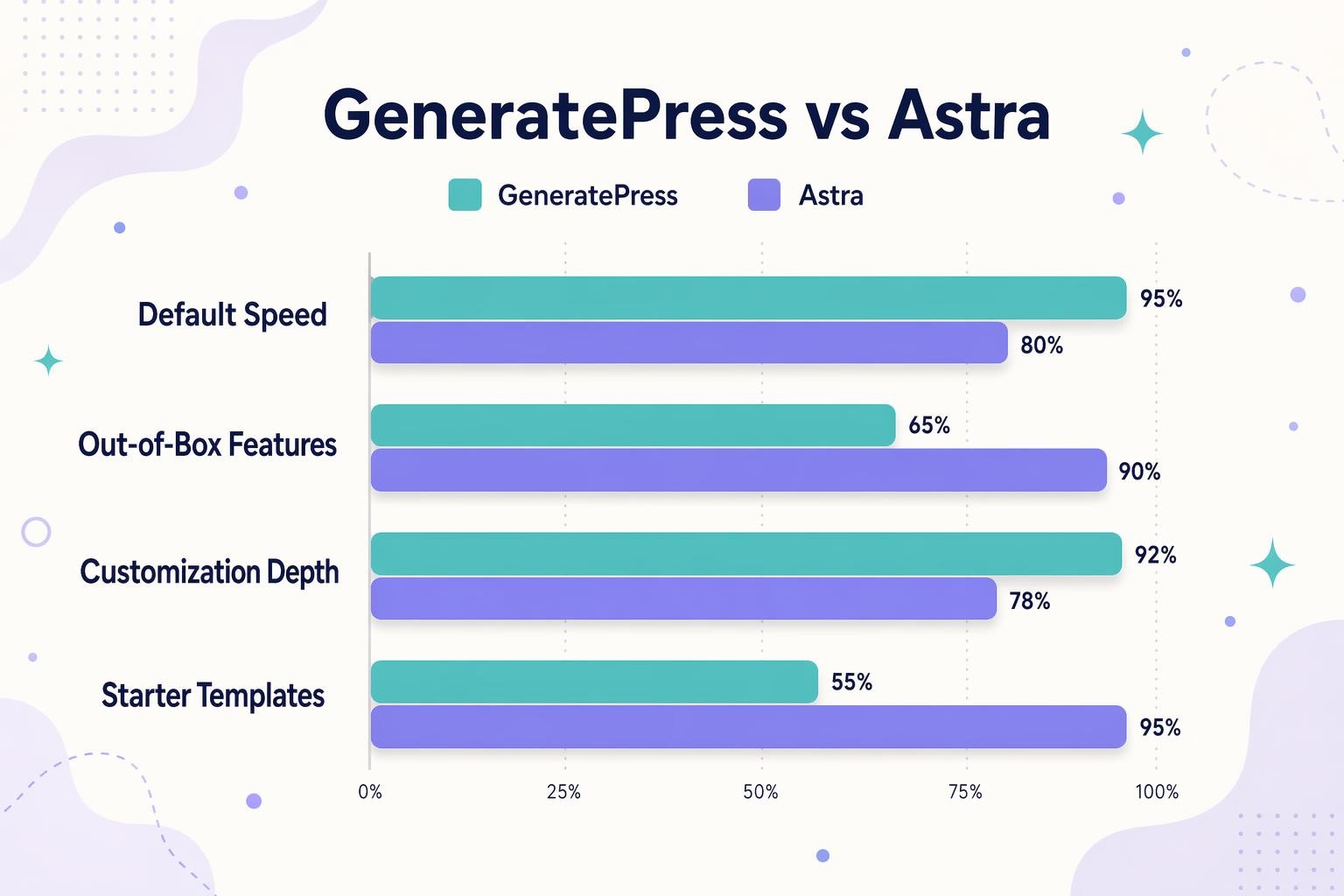
Both themes are genuinely fast. The marketing from both sides loves to quote specific millisecond numbers, but in real-world use with 10+ plugins and a proper content build, the speed difference between them is 50-150ms at most, and easily swamped by hosting, image optimization, and caching choices.
That said, there are real philosophical differences:
- GeneratePress ships with fewer features enabled by default. You opt into what you need. The baseline is extremely minimal, which makes it easier to get a sub-100KB initial page load
- Astra ships with more features available out of the box (header builder, starter templates, WooCommerce styles, block editor enhancements). These can be disabled, but they’re on by default, which slightly increases baseline weight
For a content-focused blog where every KB matters, GP wins by a hair. For a business site where you need the extra features anyway, Astra’s baseline is more than fast enough.
Both pass Core Web Vitals easily when paired with a decent host, WP Rocket or similar caching, and properly compressed images. See testing WordPress theme speed for the testing methodology.
SEO features and plugin compatibility
Both themes take the same sensible approach: keep the theme’s SEO footprint minimal and let a dedicated SEO plugin handle the heavy lifting.
- Both emit clean semantic HTML with proper heading hierarchy
- Both work cleanly with Rank Math, Yoast SEO, and SEOPress
- Both pass accessibility basics (ARIA, keyboard nav, alt text support)
- Both output basic schema and let your SEO plugin handle advanced structured data
If advanced schema markup matters (Organization, Product, LocalBusiness, FAQ, Recipe, etc.), you’ll lean on Rank Math, Yoast, or Schema Pro regardless of theme choice. Neither theme emits advanced schema on its own. For more on this, see schema markup in WordPress themes.
Customization: developer vs beginner
GeneratePress: developer-forward
GeneratePress is designed for people who know what they’re doing. The premium Elements module lets you add custom hooks, inject code into any part of the site, and build layouts with granular control. If you’ve written a child theme, forked a hook, or need WordPress to do something specific, GP gives you the tools.
The tradeoff: it’s less visual. Beginners opening GP for the first time often find it minimalist to the point of being confusing (“where’s the starter template library?”). It’s there, but it’s not the center of the experience.
Astra: visual-first
Astra optimizes for the person who wants a professional-looking site launched in a day without touching code. The Starter Templates library is the headline feature: 300+ pre-built site designs that import in one click and work with Gutenberg, Elementor, Beaver Builder, Spectra, or Brizy.
The drag-and-drop header and footer builders, global color palette, and typography controls mean you can customize a site fully without ever seeing code. For most small business owners, freelancers, and agencies delivering to clients, this is the right tradeoff.
Ecosystem and add-ons
GeneratePress ecosystem
- GenerateBlocks: a block plugin for the native WordPress editor. Used alongside GP or any block theme. Powerful containers, grids, and typography blocks
- GenerateCloud: starter templates and patterns, now bundled in the GeneratePress One plan
- Small but tight ecosystem. Everything ships from the same team
Astra ecosystem (Brainstorm Force)
- Starter Templates: free plugin with 300+ pre-built sites
- Spectra: block editor plugin (Gutenberg blocks)
- Schema Pro: separate plugin for advanced structured data
- CartFlows: checkout optimization for WooCommerce
- Ultimate Addons for Elementor/Beaver Builder: widget packs for page builders
Astra has a much wider ecosystem because Brainstorm Force makes more products. If you’re going to use CartFlows for checkout or Schema Pro anyway, the bundled pricing starts to make sense.
Pricing (as of 2026)
Both free versions are solid and usable for real sites. The paid tiers differ significantly:
GeneratePress pricing
- One annual premium plan for up to 500 sites
- GeneratePress One bundle: GP Premium + GenerateBlocks Pro + GenerateCloud
- No lifetime licenses for new customers (existing lifetime holders grandfathered)
- Simple and predictable. You pay once a year and you’re done
Check current pricing at generatepress.com.
Astra pricing
- Astra Pro: the base paid theme, single or multi-site options
- Essential Toolkit: Astra Pro plus Ultimate Addons for Elementor and Spectra Pro
- Growth/Business Toolkit: adds CartFlows Pro, Schema Pro, and more
- Lifetime licenses still offered on all tiers
Astra’s pricing is more complex but also more flexible. If you want to pay once and forget about it, Astra’s lifetime tier makes sense. Check current pricing at wpastra.com.
Which to pick by use case
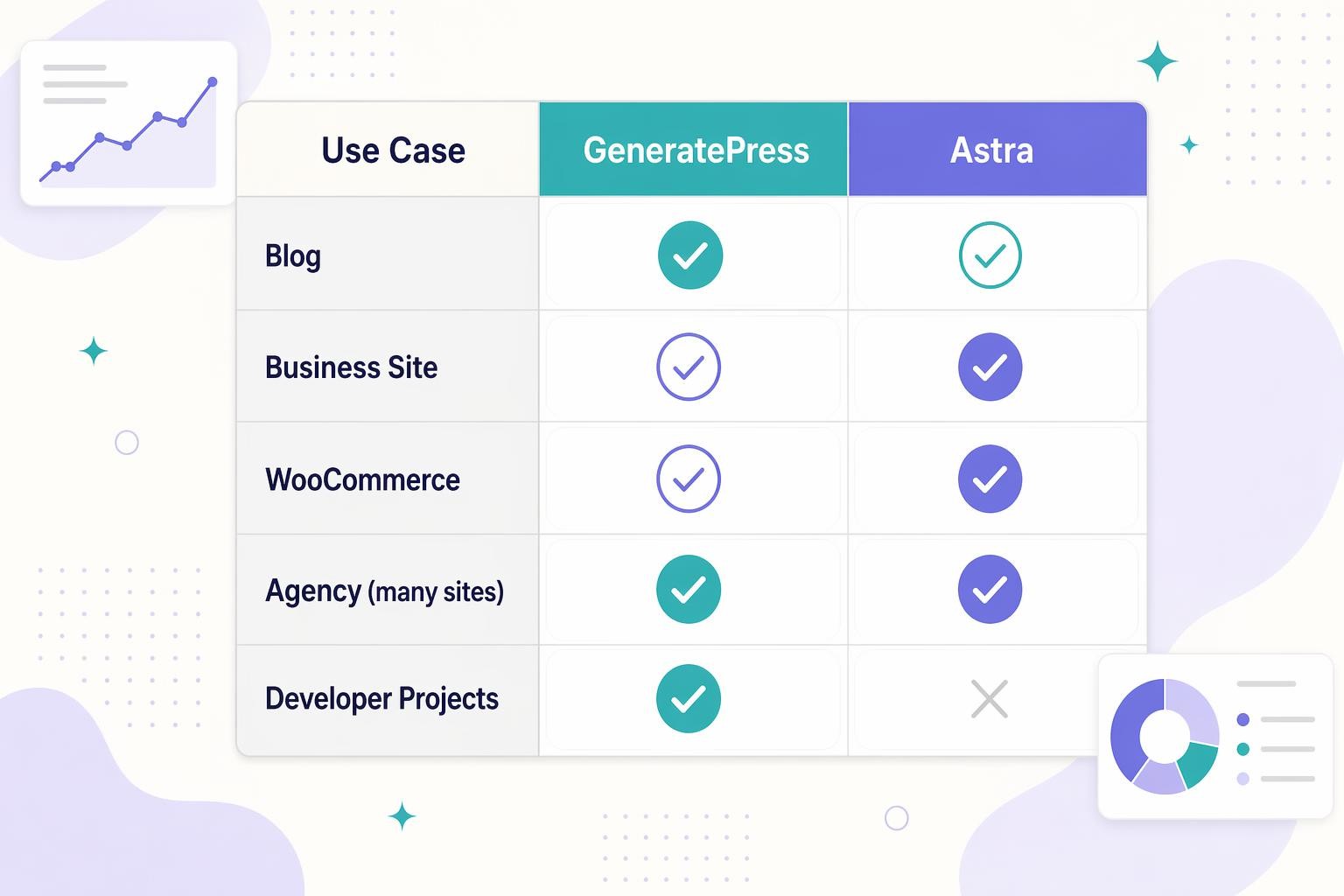
For a content blog
GeneratePress. The minimal default styling and developer-friendly hooks make it the cleanest foundation for a content-heavy site. This is what I use on several of my own content properties.
For a business or service site
Astra. The starter template library lets a non-designer launch a credible-looking site in hours. Pair it with the Essential Toolkit if you’re using Elementor.
For WooCommerce
Astra. The WooCommerce integration is deeper, the templates include working stores, and CartFlows is a meaningful upgrade for checkout optimization. GP works fine with WooCommerce too, but Astra’s head start is real.
For agencies managing many sites
Either works, but Astra’s 1,000-site licenses and white-labeling are better suited for agency workflows. GP’s flat 500-site limit is fine for smaller agencies.
For custom developer projects
GeneratePress. The hook system, minimal defaults, and clean codebase make it much easier to extend. Astra’s deeper plugin-integration layer can fight you when you’re trying to override defaults.
What the 2026 block-theme shift means for both
WordPress has moved decisively toward Full Site Editing and block themes. Both GeneratePress and Astra are “classic” themes with strong block editor compatibility but aren’t pure block themes.
If you want a pure block theme, Twenty Twenty-Four, Twenty Twenty-Five, Ollie, and Blocksy are better fits. See my post on WordPress Full Site Editing for more context.
For now, GP and Astra remain excellent choices for hybrid workflows where you want the stability of a classic theme with block editor support throughout.
My recommendation
I’ve built dozens of sites on both themes over the years. My current defaults:
- Personal content sites and blogs: GeneratePress + GenerateBlocks
- Client business sites: Astra + Starter Templates + Elementor
- Client WooCommerce stores: Astra + CartFlows
- Custom development projects: GeneratePress + custom child theme
Neither is universally better. They serve different audiences. Both are worth learning if you build WordPress sites for a living.
The short version
GeneratePress wins on raw speed, developer ergonomics, and pricing simplicity. Astra wins on starter templates, WooCommerce integration, and ecosystem breadth. Both pass Core Web Vitals. Both work with every major SEO plugin. Both have generous free versions worth testing. Pick based on whether you want a lean foundation you’ll build on (GP) or a full-featured launchpad (Astra). If you’re torn, install both on staging and spend an hour with each. The one that feels right to you is the one to ship with.

Leave a Reply