
A content audit is a systematic review of every post on your blog with one goal: decide whether to keep it, update it, consolidate it, or remove it. Done well, an audit can recover 20-40% of lost organic traffic on sites with years of accumulated content.
This post walks through the actual workflow I use for content audits on my own sites and client sites: what data to pull, what criteria to score against, and what to do with each bucket of posts when you’re done.
When to run a content audit
Not every blog needs an audit every quarter. The triggers:
- Organic traffic is flat or declining despite continued publishing
- A Google core update caused a meaningful drop
- Your content is over 2 years old and has never been systematically reviewed
- You’re about to do a major redesign or platform migration
- Your blog has 100+ posts and you’re no longer sure what’s on it
For small blogs (under 30 posts), a full audit is usually overkill. Just refresh the top 5 posts every 6 months and you’ll cover 80% of the benefit. See increase blog traffic for the refresh-only workflow.
The 4 outcomes: Keep, Update, Promote, Remove
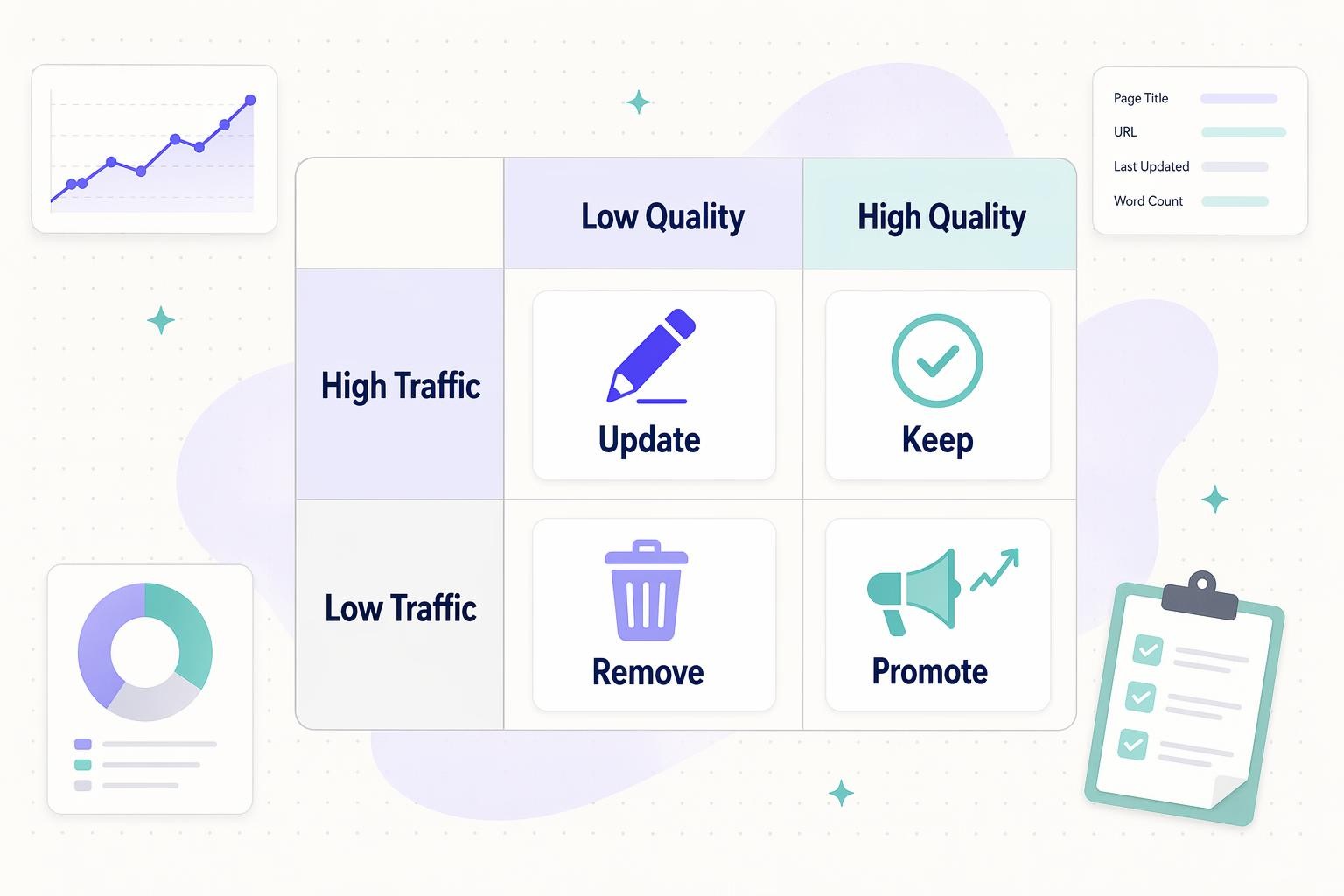
Every post you audit ends up in one of four buckets based on traffic and content quality:
- Keep high-traffic posts with solid content. Monitor, occasionally refresh, don’t break what’s working
- Update high-traffic posts with weak content. Biggest single win in most audits. Rewrite and republish
- Promote low-traffic posts with genuinely good content. Add internal links from high-authority pages, share, build links
- Remove or consolidate low-traffic posts with weak content. Redirect to a better page, merge into a pillar post, or set to noindex
The bucket assignment is where most of the strategic thinking happens. The data pulls are mechanical. The decisions aren’t.
Step 1: Pull your content inventory
First, get a complete list of every post on your blog with its URL, publish date, and last modified date. Options:
- Screaming Frog (best for sites up to ~10k URLs, free up to 500)
- WordPress REST API:
GET /wp-json/wp/v2/posts?per_page=100looped through pages - Your XML sitemap as a starting list (see how to find your sitemap)
- Ahrefs or Semrush site crawl exports
Dump the inventory into a spreadsheet. One row per URL. You’ll be adding columns as you collect more data.
Step 2: Pull traffic and ranking data
For each URL, add these columns:
- Organic sessions last 90 days (Google Analytics or GA4)
- Organic sessions trend (% change vs. previous 90 days)
- Target keyword and its current position (Ahrefs, Semrush, or Google Search Console)
- Impressions and average position last 90 days (Google Search Console)
- Click-through rate (impressions vs. clicks)
- Number of referring domains (backlinks)
- Number of internal links pointing TO the page
Search Console’s bulk export (or the URL Inspection API) gets the ranking data. Screaming Frog + API integrations can pull the rest in one pass.
If you’d rather not juggle CSV exports, you can connect Search Console directly to Claude and ask for the same impressions, CTR, and striking-distance data in plain language.
Step 3: Score each post on content quality

This is the subjective part. For each post, score it 1-5 on:
- Writing quality (well-edited, clear, non-AI-slop)
- Accuracy (information is still correct as of today)
- Depth (thoroughly covers the topic vs. thin skim)
- First-person experience (original insight or generic roundup)
- Structural health (headings, lists, visuals, internal links)
Average the five scores per post. Anything under 3 is a low-quality flag.
For large sites, you can spot-check by having ChatGPT grade posts against a rubric (see using ChatGPT for SEO) but verify the scores on a random sample manually.
Step 4: Assign each post to a bucket
Using traffic and quality scores, sort every post into one of the four buckets from the matrix above. Rough thresholds I use:
- “High traffic” = top 20% of posts by organic sessions, OR anything above 1,000 sessions per month (adjust for your site’s scale)
- “Low traffic” = below 50 sessions per month AND no meaningful growth trend
- “High quality” = average score 4 or above
- “Low quality” = average score below 3
Posts in the middle (3-4 quality, moderate traffic) stay as-is until the next audit.
Step 5: Execute on each bucket
Keep (high traffic + high quality)
Don’t break what’s working. Actions:
- Light refresh every 12 months: update stats, dates, and 2-3 internal links to newer related content
- Monitor weekly for ranking drops (Search Console email alerts)
- Don’t change the URL, title, or primary keyword unless absolutely necessary
Update (high traffic + low quality)
Biggest single opportunity in most audits. Actions:
- Full rewrite keeping the URL intact
- Add first-person experience and specific details
- Answer the query in the first 100 words (see how to format a blog post)
- Strip AI-trope language
- Verify every statistic and citation
- Re-submit the URL in Search Console after publishing
Google rewards genuine improvements. It ignores cosmetic tweaks like changing the publish year in the title.
Promote (low traffic + high quality)
Content is good, nobody knows about it. Actions:
- Add 3-5 internal links from your highest-traffic pages
- Reshare on your usual distribution channels
- Check the keyword: is the page targeting a query nobody searches for? If so, this becomes a bucket-4 problem
- Consider link-building outreach if the topic genuinely warrants it
Remove or consolidate (low traffic + low quality)
Content is hurting more than helping. Options, in order of preference:
- Consolidate into a pillar post: merge 3-5 related thin posts into one comprehensive post, 301 redirect the old URLs
- 301 redirect to the closest relevant live page
- Set to noindex if the page has some utility but shouldn’t compete in search
- Delete the page only if it has zero inbound links and zero user value (true last resort)
Never just delete a page. Every URL that ever ranked has some residual link equity, and a hard 404 loses all of it. See broken links and how to fix them for redirect workflows.
Tools I actually use
- Data pull: Google Search Console bulk export, GA4, Ahrefs or Semrush site audit
- Crawling: Screaming Frog (free up to 500 URLs)
- Spreadsheet: Google Sheets with filters and pivot tables
- Content grading assist: ChatGPT or Claude with a rubric prompt, verified on a random sample
- WordPress-specific: Rank Math’s Analytics or Yoast’s Premium content insights, Link Whisper for internal-link audits
- Content production at scale: RightBlogger for the refresh and consolidation phase, especially on sites with 50+ posts to update
How often to run a full audit
- Sites with 100-500 posts: annually, plus targeted mini-audits after each Google core update
- Sites with 500-2,000 posts: every 18 months, or continuous rolling audits on sections of the site
- Sites under 100 posts: skip the formal audit and just refresh the top 10 quarterly
- Any site: immediate partial audit after a core update drop affecting more than 20% of traffic
Common mistakes
- Auditing without a data pull first (decisions become vibes-based)
- Only looking at sessions and ignoring impressions (impressions show where you’re on the edge of ranking)
- Deleting pages instead of redirecting them
- Changing URLs during an audit (every slug change needs a 301, see SEO slugs)
- Refreshing everything equally instead of prioritizing by bucket
- Skipping the quality score and only using traffic data (traffic alone is backward-looking)
The short version
A content audit is a scored sort of every post on your blog into four buckets: keep, update, promote, or remove. Pull traffic and ranking data, score each post 1-5 on quality, apply the 2×2 matrix, then execute. Update is usually the biggest opportunity. Always redirect instead of deleting. Run annually on mid-size sites, faster after a core update hits.

Leave a Reply